How To Get To The Gallery, Till Steve Fixes It

Devilman

Well-known member
Like the title sez lol 😁

From the forum page:

1. Click the 3 lines in the upper left corner

Screenshot_20260310-114107~2.jpg

2. After the side panel opens, go down and click on Media
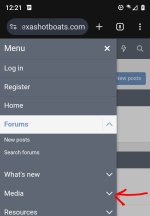
Screenshot_20260310-122137~2.jpg

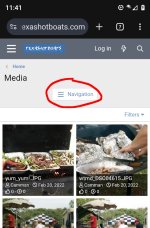
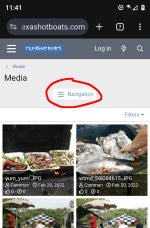
3. Click on Navigation
Screenshot_20260310-114157~2.jpg

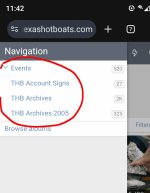
4. You can click on any of these 3 and go see a buncha old ass pics 👍🏿😁

Screenshot_20260310-131545~2.jpg


🥴😆
 

Attachments

  • Screenshot_20260310-114157~2.jpg
    Screenshot_20260310-114157~2.jpg
    147.8 KB · Views: 2
  • Screenshot_20260310-114212~2.jpg
    Screenshot_20260310-114212~2.jpg
    55.2 KB · Views: 2
Last edited:

Devilman

Well-known member
I think it's been this way since y'all kicked it back off awhile back. Pretty sure it was you that told me about the media thing. Either way, good that the work-around still works.. can go down memory lane lol
 

Patchman

Administrator
Staff member
Yeah, it looks different when looking at it on PC. Just click on media and it's all right there. We do have some up-dates for the host, so who knows what will happen when we implement them!:cool:
 
Top